Introduction
Overview
NUCLEUS is Dedomena.AI’s privacy solution. It lets you keep working with your data — for analytics, development, testing, or sharing — without exposing the personal and sensitive information it contains. NUCLEUS produces datasets that preserve the value of the originals while anonymizing any personally identifiable information (PII), patterns and behaviors, helping you comply with regulations such as GDPR, LOPD, and CCPA.
NUCLEUS offers two complementary capabilities:
| Capability | What it does | When to use it |
|---|---|---|
| Anonymization | Protects the sensitive elements of an existing dataset or file — columns in a table, or regions of an image, document, or audio file — while keeping everything else exactly as it was. | When you need to keep the exact structure of the original data but protect specific sensitive elements — for example, sharing data internally between teams. |
| Synthetic Data | Creates a brand-new dataset that looks and behaves like the original but contains no real records. | When you want to expand a dataset, provision realistic data for development and testing, or share data externally with no link to the original records. |
Both capabilities work on the same assets (your datasets and files) and are available whether you use the platform in the cloud, through the API or on your own infrastructure.
How NUCLEUS Works
Using NUCLEUS always follows the same three simple steps:
-
Add & analyze. You upload a file or connect a data source using AXON (Cloud, API or Edge). NUCLEUS analyzes it and automatically detects the sensitive elements it contains and what type they are (a name, an ID, a face in a photo, a spoken phone number, and so on).
-
Protect. You choose how to protect the data — either by anonymizing the detected sensitive elements, or by generating a synthetic version of the dataset. Sensible defaults are proposed automatically, and you can adjust them.
-
Use. The protected result is saved as a new asset that you can download, export, share, or use in any downstream process.
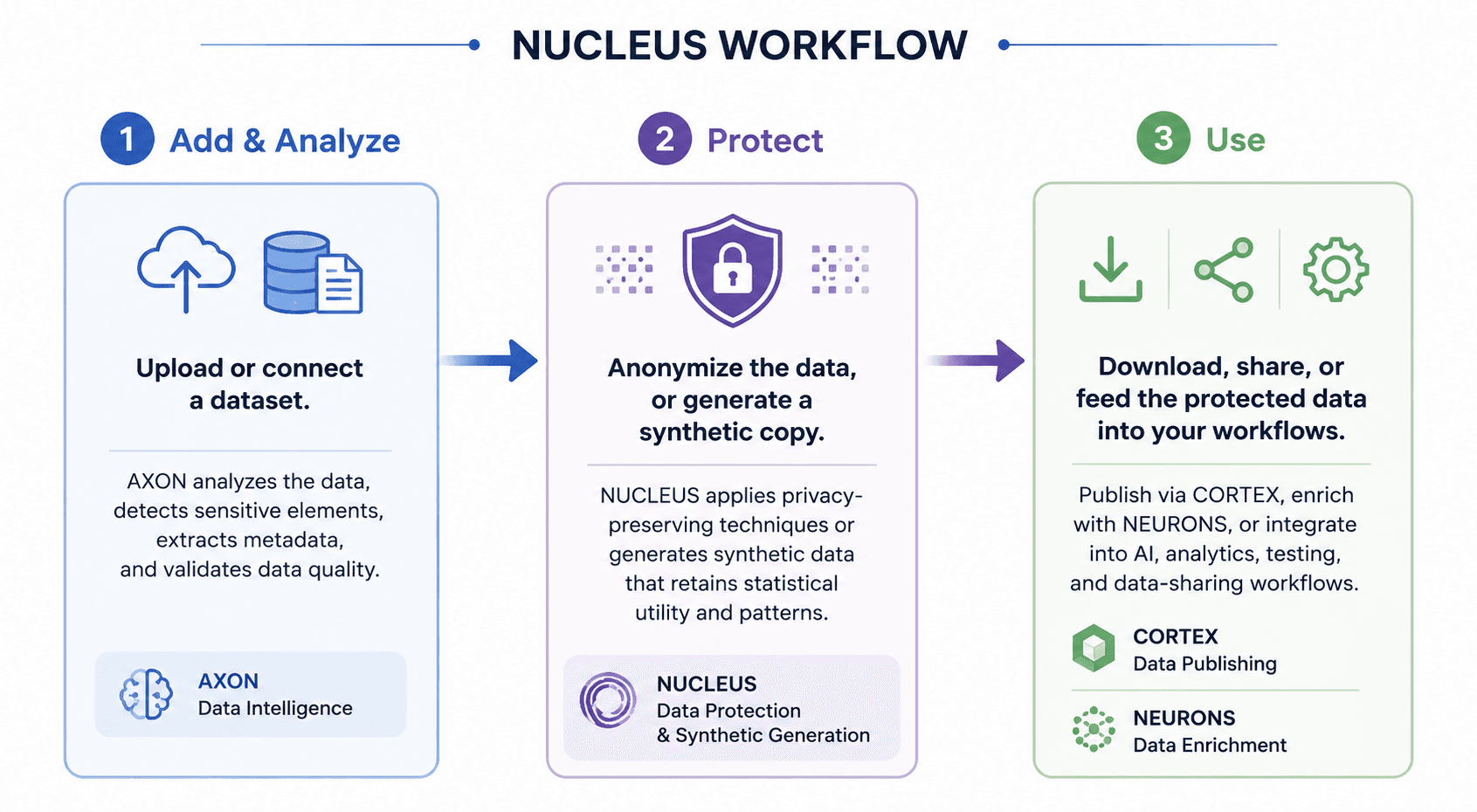
In the case of anonymization, because the sensitive elements are identified during the analysis step, protection is applied to exactly what was detected — nothing sensitive is missed, and nothing unnecessary is altered. Synthetic data algorithms are more complex and lead to new data generation including extra features like differential privacy, outliers privacy module, PII protection module, sensitive column type classification, etc.
Ways to Use NUCLEUS
You can use NUCLEUS in three ways, depending on your data-governance needs:
-
NUCLEUS Cloud — the managed SaaS platform. You work through the web application interface; everything happens for you online. This is the simplest option and requires no setup.
-
NUCLEUS Edge — an on-premise component that runs on your own machines, right next to your data. Your raw data never leaves your environment; only the finished result (a synthesizer —encrypted mathematical model— when creating synthetic data) is sent back to the platform to be used later. Choose Edge when your policies require that data stay inside your perimeter.
-
DEDOMENA.AI REST API — which exposes the same capabilities as the web application so you can automate them from your own applications and pipelines. You can anonymize any asset registered on the platform — tables, documents, images, and audio — by sending a configuration that maps each sensitive element to the anonymization method you want, and you can also train synthesizers and generate synthetic datasets programmatically. Choose the API when privacy has to run unattended inside an existing workflow (ETL jobs, CI/CD pipelines, data-provisioning services).
All options offer the same capabilities, methods, and quality evaluation. This guide covers the web platform in the Cloud Guide section, the REST API in the API Guide section, and the on-premise component in the Nucleus Edge section.
Concepts
This section explains the ideas and concepts you will encounter when using NUCLEUS. You do not need a technical background to follow it.
Data Selection
Everything in Dedomena.AI starts with an asset. An asset is simply a piece of data you have registered on the platform, together with its description (metadata). An asset can be:
-
A structured table — rows and columns, like a spreadsheet or a database table.
-
An unstructured file — an image, a document, or an audio file.
-
A collection of related assets — several assets linked together and handled as a unit. A collection can combine structured and unstructured data: two related tables (for example, customers and their orders), or a table together with the files it refers to (for example, a CSV of candidates and the PDF files of their CVs). NUCLEUS keeps the links between the assets of a collection consistent when it protects them (see Consistent anonymization across related assets).
Original, anonymized, and synthetic assets. When you protect an asset, NUCLEUS creates a new asset with the result and keeps the original untouched. Each asset is labelled by type — original, anonymized, or synthetic — so you always know what you are looking at.
Analysis. Before you protect anything, AXON analyzes the asset and detects its sensitive elements and their types. For tables, this means understanding each column (is it a name, an amount, a date, a category?); for files, it means locating sensitive regions (a face, a signature, a line of text, a spoken segment). This analysis is what powers the automatic suggestions you see later.
Column types (for tables). For tables, the type assigned to each column matters, because it determines which protection methods are available and how the column is handled. Typical types are text, number, category, true/false, date, identifier, and coordinates.
Privacy-Preserving Transformation
NUCLEUS protects data in two different ways. They are complementary, and which one you choose depends on what you need.
Anonymization modifies the sensitive parts of your real data and leaves everything else exactly as it was. The structure and the non-sensitive values are preserved, so the result is your real dataset with the sensitive elements hidden or replaced. Some methods can be reversed by an authorized administrator; others cannot.
Synthetic data does not modify your real data at all. Instead, NUCLEUS learns the patterns of your dataset and creates an entirely new dataset from scratch. None of the generated records reproduces a real record from your source data — so nothing can be traced back to a real individual or entity — yet the new dataset keeps the same statistical behaviour (distributions, relationships, and patterns) as the original. You also decide how much data to generate: the synthetic dataset can have the same number of records as the original, or as many (or as few) as you need.
| Anonymization | Synthetic Data | |
|---|---|---|
| Result | Your real data with sensitive elements protected | A brand-new dataset, statistically similar to the original |
| Structure | Identical to the original | Similar behaviour, not a row-by-row copy |
| Link to the original records | Reduced, depending on the method | None |
| Can be reversed | For some methods, under supervision | Not applicable |
| Best for | Keeping the exact structure; internal sharing | Expanding data; development/testing; external sharing |
Anonymization Methods
Anonymization methods are applied to the sensitive elements detected during the analysis process. The methods available for a given element depend on the type of the detected sensitive element (for files: text, image, or audio) or, for tables, on the data type of the sensitive column (string, numeric, categorical, boolean, or datetime).
NUCLEUS automatically selects a default method for every sensitive element, but you can choose any other supported method when configuring the anonymization.
Available methods by element / data type
| Sensitive element / Column type | Available methods (default in bold) |
|---|---|
| Images (Visual) | Blur, Pixelate, Redact |
| Audio | Beep, Silence, Remove |
| Numeric | Perturb, k-anonymization, Shuffle, Mask, Hash, Drop |
| Datetime | Shift, k-anonymization, Perturb, Shuffle, Mask, Drop |
| String (free text) | Mask, Simulation, Pseudonym, Coding, Regeneration, Hash, Shuffle, k-anonymization, Drop |
| Categorical | Mask, Simulation, Pseudonym, Shuffle, Hash, k-anonymization, Drop |
| Boolean | Shuffle, Mask, Drop |
Method descriptions
| Name | Description |
|---|---|
| Mask | Replaces the value with another of the same length that reveals nothing. With asterisks it keeps the first and last character visible and fills the rest with asterisks: 12345678Z becomes 1*******Z. With opaque it replaces every character with another of its own class — digit for digit, letter for letter — keeps none of the original and preserves separators, so the shape survives: trc_8f31c0a9 becomes something like kqz_4b07f2e1. Equal values always get the same string, which is drawn at random and stored in the equivalence table: it is never derived from the real value. |
| Hash (SHA-256) | Transforms data into a unique, irreversible string — a digital fingerprint of the value. Ideal for names, companies, or credit-card numbers when you need to compare values without viewing the original text. |
| Pseudonym | Replaces each distinct value with a new identifier, so a record can still be followed across datasets without identifying anyone. You can give it the shape the identifiers must have — for example EMP-\d\{6\}, which produces EMP-481902 — and it guarantees that no two records ever receive the same one. Without a shape, identifiers are generated freely. |
| Coding | For free text: finds the personal data inside the sentence and replaces it, keeping the text readable. It works in three modes. Tokens marks each finding — PURCHASE AT DEDOMENA.AI, MADRID → PURCHASE AT \{Company_1\}, \{City_1\}. Surrogates writes a believable value instead, and reuses the one that same person or company already received in their own column, so the text still agrees with the rest of the table. Invented writes a new believable value without tying it to anything. |
| Simulation | Generates a believable fictitious value rather than noise, so the column still looks like what it is. You choose what kind of value to generate (name, surnames, address, email, phone, IP address, and so on). Emails, phone numbers and URLs are built from reserved ranges, which means a generated value can never turn out to belong to a real person. |
| Shuffle | Randomly shuffles cell values within the same column. Breaks the link between an individual and their specific data while preserving the overall sum, average, and statistical distribution of the column. |
| k-anonymization | Raises the granularity of the value so that none of them points at too small a group. The number means something different per column type. On numeric ones it is the width of the range and accepts decimals: 10 turns 34 into 30-40, and 0.05 turns a score of 0.7314 into 0.70-0.75. On text or coded ones — city, postcode, language — it is the minimum number of occurrences a value needs to be kept, it is read as an integer, and those below it are grouped under the label Others. |
| Perturb | Adds statistical noise to numeric values, enough to prevent re-identification while preserving the distribution and the averages of the column. You set how much, from 0 to 1 — 0.05, a 5% deviation, is the default. |
| Shift | Moves a date instead of hiding it, so the column stays usable as a date. Every row of the same entity moves by the same interval, which keeps ages, seniority and the order of events adding up. You choose which column identifies the entity. |
| Regeneration | Discards the original text and writes a new one from the values the record has already been given, keeping the language, the tone and a similar length. It is for the fields so dense in personal data that looking for what to hide is not safe enough: instead of hiding parts, nothing of the original is delivered. |
| Drop | Removes the column from the delivery. For fields that carry nothing you need — a profile photograph, an internal note — where the safest thing is not to deliver them at all. |
| Blur | Applies a blur effect to a sensitive visual area, reducing its sharpness without removing it completely. |
| Pixelate | Applies pixelation to a sensitive visual area to conceal details while keeping the area visible. |
| Redact | Completely covers or hides a sensitive visual area. |
| Beep | Replaces the audio segment with a beep tone. |
| Silence | Silences the audio segment. |
| Remove | Cuts the segment out of the audio. |
Fine-tuning a method
Beyond choosing the method, four options change how it behaves on a given column. All of them are optional.
| Option | What it does |
|---|---|
| Reference | Points a column at another column's replacements, so a foreign key receives exactly what the entity received in its own table and the data still joins. Written as table.column. |
| Derive from | Builds the value out of the already replaced values of other columns in the same row. Typically the email from the new name, so the two agree instead of describing two different people. Two records that would collide get a distinguishing suffix, so a derived value is never shared. |
| Group variants | On by default. Variants of the same value inside a column receive the same replacement — Dedomena and Dedomena.AI become the same fictitious company — without relying on detection. Comparison is by whole words, so Ana is not folded into Anabel. Turn it off where near-identical values are genuinely different entities. |
| Type | Declares the column's type instead of letting it be inferred. It matters when inference would get it wrong: a postcode such as 08001 read as a number becomes 8001, and no later step can bring the zero back. |
Reversibility
Some methods keep a private mapping between the original and the protected value, so an authorized administrator can recover the original later. Others are one-way and cannot be reversed.
| Reversible (mapping-based) | Irreversible |
|---|---|
| Pseudonym, Simulation, Mask, k-anonymization | Hash (SHA-256), Shuffle, Perturb, Coding, Blur, Pixelate, Redact, Beep, Silence, Remove |
> Tip. Use irreversible methods for your most sensitive elements, and reserve reversible methods (in particular Pseudonym) for cases where you may need authorized recovery of the original value.
Consistent anonymization across related assets
When anonymizing related assets, the platform preserves the relationships between them by applying consistent replacements across all connected files.
For example, consider a collection containing:
-
A CSV file with candidate information (such as names and contact details).
-
A set of PDF files containing the corresponding candidates’ CVs.
If the Simulation method is used to replace candidate names in the CSV, the same generated names are automatically applied to the corresponding names found in each candidate’s CV. This ensures that the anonymized collection remains internally consistent, preserving the links between structured and unstructured data while preventing disclosure of the original identities.
The same consistency is maintained for any supported anonymization method that generates deterministic replacements, allowing related information to remain correctly linked across datasets, documents, images, audio, and other assets within the same collection.
Synthetic Data
Synthetic data is data created by NUCLEUS rather than taken from your real records. A good synthetic dataset behaves like the original — the same distributions, the same relationships between columns, the same overall patterns — so your analyses and models work just as they would on real data. But because no synthetic record reproduces a real one, there is nothing to trace back to a real individual or entity.
Synthetic data is especially useful when you want to:
-
Expand a dataset — generate more rows than the original contains.
-
Provide realistic data for development, testing, and demos without exposing production data.
-
Share data with partners, vendors, or the public. Properly generated synthetic data is generally not considered personal data under European regulators’ guidance.
-
Rebalance a dataset — increase or decrease the presence of specific groups (see Conditional generation).
Synthesizers
A synthesizer is the model NUCLEUS trains on your data so it can create synthetic versions of it. Think of it as a reusable recipe: you train it once, and from then on you can generate as much synthetic data as you need, whenever you need it, without training again.
-
Reusable. After training, generate any number of rows on demand.
-
Secure. Synthesizers are stored in an encrypted, protected form. When you use Nucleus Edge, only this protected synthesizer is sent back to the platform — your raw data stays with you.
-
Updatable. You can retrain a synthesizer with fresh data as your source data evolves, so it stays current over time.
While a synthesizer is being created, its status moves through a few simple states: in progress, then ready (success) or failed. Occasionally a synthesizer is created successfully but its quality report could not be generated — in that case the synthesizer is still fully usable.
Training Configuration
Each synthesizer can be configured before training in order to optimize the balance between privacy, quality, and generation performance.
Available configuration options include, among others:
| Parameter | Description |
|---|---|
| Batch size | Size of each training batch. Powers of two (128, 256, 512, etc.) are recommended depending on the dataset size. |
| Epochs | Number of complete training iterations. Values between 100 and 300 are typically recommended for Generic and Transactional synthesizers. |
| Amplify | Controls the optimization objective. The default configuration maximizes privacy. The quality option slightly improves synthetic data fidelity while reducing privacy guarantees. |
| Impute missing values | When enabled, missing values are completed before training. Otherwise, the synthesizer learns the original missing-value distribution and reproduces it during generation. |
Additional algorithm-specific parameters are available depending on the selected synthesizer.
During training, users can also define data constraints that must always be respected by the generated synthetic data.
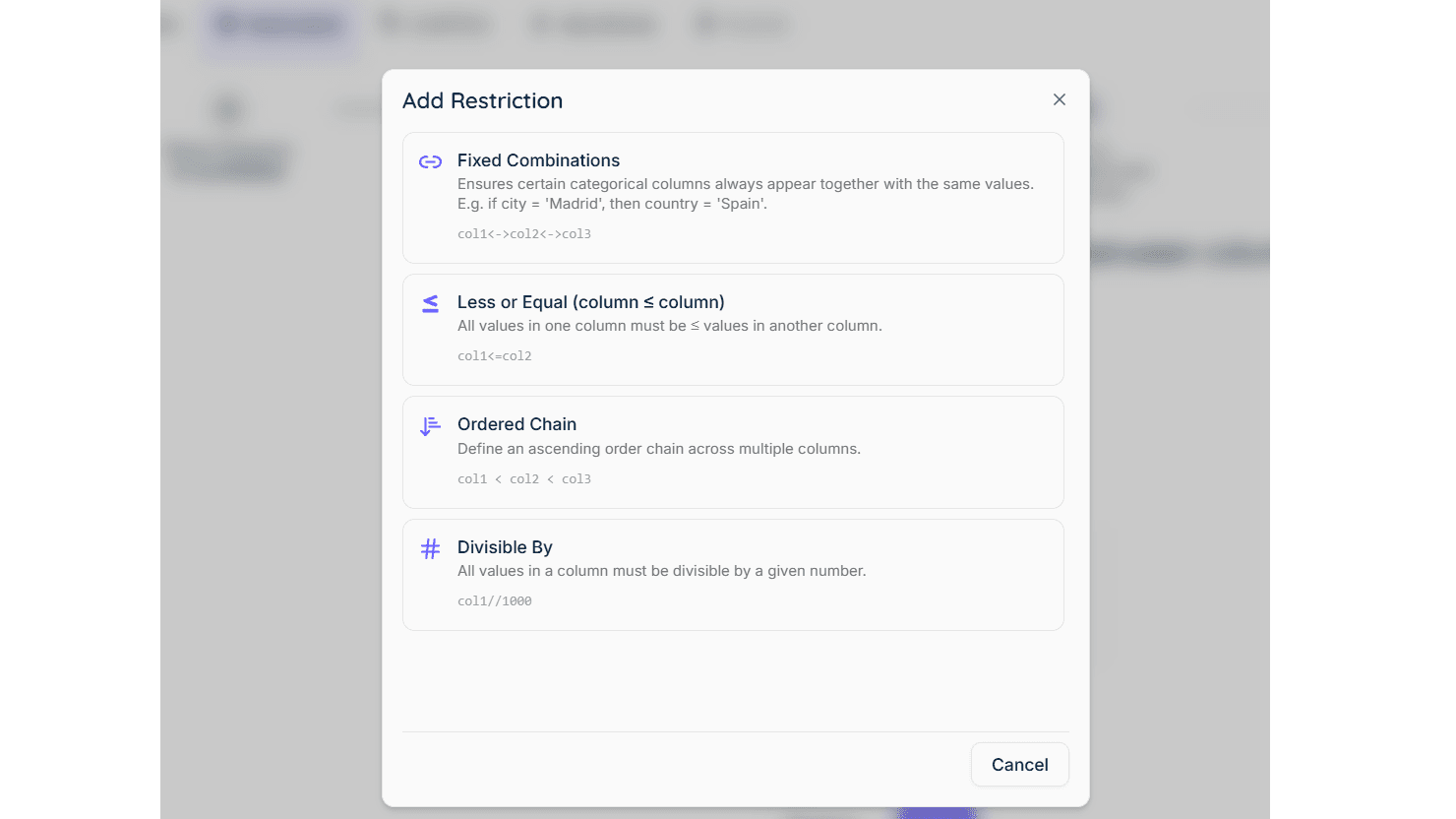
Examples include:
-
Madrid → Country must always be Spain.
-
Start date must always be earlier than End date.
-
Age must always be greater than 18.
-
Product price cannot be negative.
These constraints ensure that generated records remain logically valid while preserving the statistical characteristics of the original dataset.
NUCLEUS also provides specialized generation strategies for different variable types, allowing each type of data to be synthesized according to its own characteristics:
-
Free-text fields, preserving the semantic structure of the original text. Users may optionally provide custom generation instructions to control how synthetic text is produced, such as its style, tone, format, language, or domain-specific content. When no instruction is provided, NUCLEUS automatically generates synthetic text by anonymizing the original content while preserving its semantic meaning and linguistic structure.
-
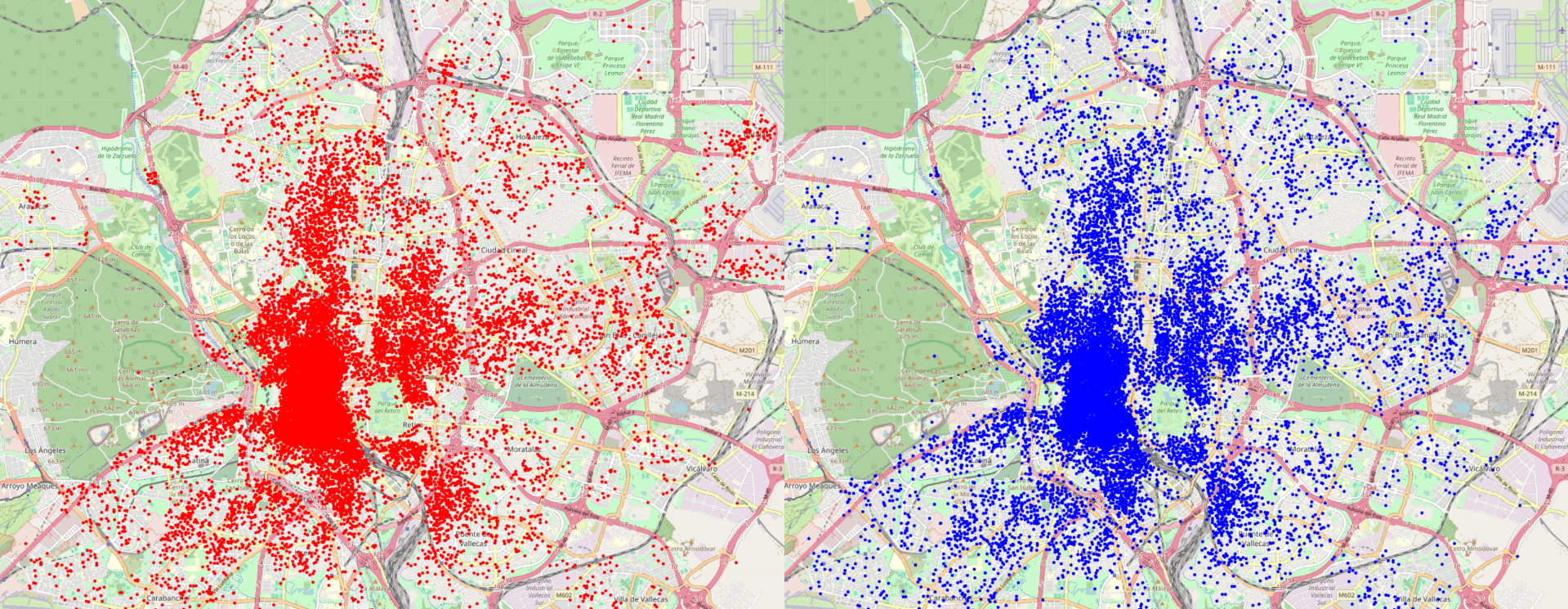
Geographic coordinates, generating realistic synthetic locations while preserving the spatial characteristics and distributions of the original data. Generated coordinates remain geographically meaningful and can be constrained to specific regions or countries when required.
-
Identifiers, generating synthetic identifiers according to user-defined formats or regular expressions. This enables realistic values such as customer IDs, policy numbers, employee codes, or other business-specific identifiers while ensuring uniqueness and consistency.
-
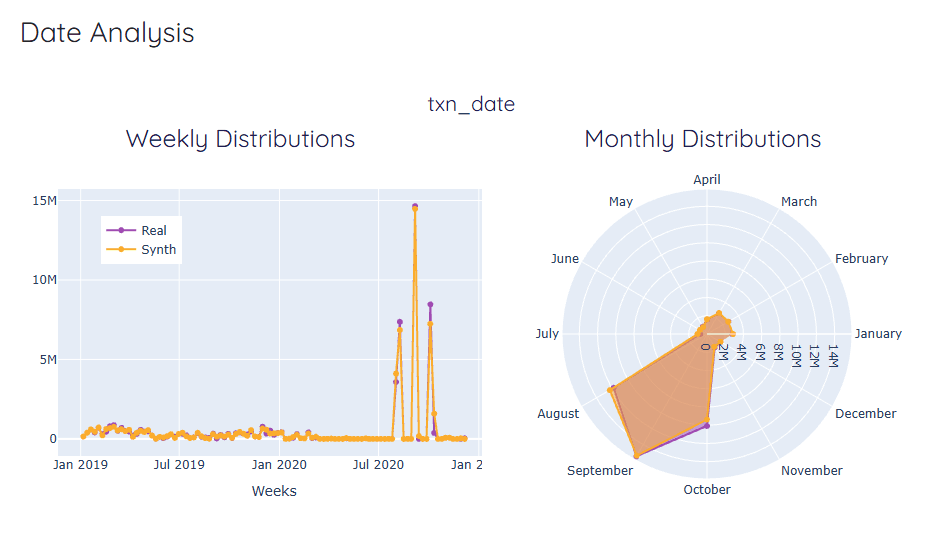
Dates and timestamps, preserving temporal characteristics such as chronology, intervals, seasonality, and event duration, depending on the selected generation algorithm, while preventing disclosure of the original values.
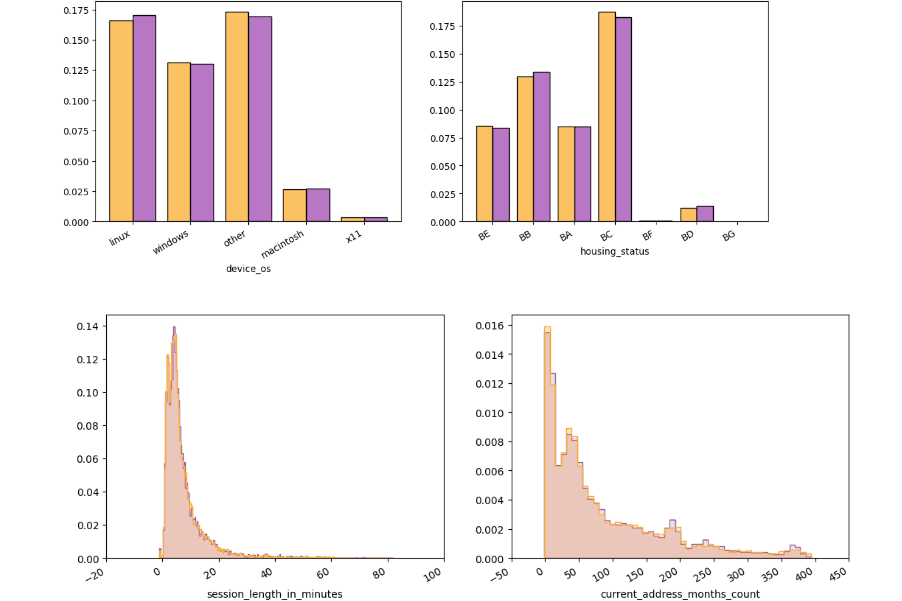
- Numerical variables, preserving statistical properties such as distributions, ranges, correlations, and aggregate metrics while generating entirely new values that do not correspond to real observations.
-
Categorical and boolean variables, maintaining category frequencies, dependencies, and relationships with other variables to produce statistically consistent synthetic datasets.
-
Domain-specific variables, using specialized generation strategies for complex business data types such as banking transactions, financial information, healthcare records, or other industry-specific attributes, depending on the selected synthesizer.
This combination of configurable training parameters, business constraints, and specialized variable generators enables NUCLEUS to produce synthetic datasets that are both statistically accurate and suitable for a wide range of downstream analytics, AI, testing, and data-sharing use cases.
Algorithms
NUCLEUS provides several specialized generation algorithms optimized for different data structures and business scenarios.
Generic
The Generic synthesizer is designed for structured tabular datasets where sequential or temporal behaviour is not the primary characteristic.
It learns statistical distributions, variable correlations, and business rules from datasets belonging to virtually any industry.
The Generic algorithm also supports fine-tuning of previously trained synthesizers, allowing models to be incrementally improved using additional data.
Recommended use cases include:
-
Customer databases
-
Healthcare records
-
HR datasets
-
CRM systems
-
Product catalogs
-
Survey data
Transactional
The Transactional synthesizer is designed for event-based and transactional datasets where events occur at irregular time intervals.
It learns behavioural patterns such as spending habits, transaction frequencies, merchant relationships, customer activity, and temporal dependencies.
For banking data, the algorithm includes dedicated capabilities for synthesizing transaction descriptions while preserving realistic financial behaviour.
Three configurable privacy levels are available:
| Level | Description |
|---|---|
| Level 1 | Synthesizes dates, amounts, card numbers, and account numbers (IBANs) appearing inside transaction descriptions. |
| Level 2 | Includes everything from Level 1 and additionally synthesizes names, addresses, and cities contained in transaction descriptions. |
| Level 3 | Includes everything from Level 2 and also synthesizes merchant names, replacing them with realistic merchants from similar industries (for example, McDonald’s → Burger King, Iberia → Ryanair). |
This algorithm is particularly suitable for:
-
Banking transactions
-
Payment systems
-
Purchase histories
-
Customer behaviour analysis
-
Fraud detection datasets
Time Series
The Time Series synthesizer is intended for regularly sampled temporal data where observations occur at constant time intervals.
It supports hourly, daily, weekly, monthly, and other equally spaced time series.
Mandatory variables typically include:
-
Entity identifier (user, product, sensor, etc.)
-
Timestamp
Additional variables associated with each observation are learned together with the temporal evolution of the series.
Typical use cases include:
-
IoT sensor data
-
Energy consumption
-
Sales forecasting
-
Financial indicators
-
Industrial monitoring
Relational
The Relational synthesizer generates synthetic datasets composed of multiple related tables while preserving referential integrity.
Supported relational datasets must satisfy the following conditions:
-
Every table must belong to the same relational graph.
-
No orphan records may exist.
-
Cyclic references are not supported.
-
Every foreign key must reference a primary key.
The algorithm learns both the statistical distributions within each table and the relationships between tables, producing fully consistent synthetic databases.
Typical applications include:
-
ERP systems
-
CRM databases
-
Healthcare information systems
-
Government registries
-
Enterprise operational databases
Quality vs. privacy dial. For the Generic and Transactional algorithms you can choose between two modes:
-
Default — favours maximum privacy.
-
Quality — boosts how closely the synthetic data matches the statistical detail of the original, with a slight trade-off in privacy.
You choose the mode that best fits your use case; NUCLEUS applies it automatically during training.
Synthetic Data Evaluation
Every time a synthesizer is trained, NUCLEUS automatically evaluates the synthetic data it produces and creates a report — you do not need to configure anything. The point of the report is to let you confirm, before you use the data, that it meets your standards.
Good synthetic data has to balance three goals at once — it must be useful, faithful to the original, and private. NUCLEUS measures all three and gives each a score from 0 to 100:
| Score | What it tells you |
|---|---|
| Privacy | How well the synthetic data protects the subjects behind your original data — for example, that synthetic records are not near-copies of real ones and that there are no accidental exact matches. Higher is safer. |
| Quality | How faithfully the synthetic data reproduces the statistics of the original — the distribution of each column and the relationships between columns. Higher is more realistic. |
| Utility | How useful the synthetic data is in practice — whether analyses and machine-learning models trained on it perform as well as on the real data. Higher is more useful. |
The evaluation report
The three scores, together with supporting details and comparison charts (real vs. synthetic), are compiled into a report that is saved alongside the synthesizer and available from the platform. For a set of related tables, the report covers each table and gives an overall result (See Synthetic Data Evaluation)
Use this report to check that a synthesizer meets your standards for utility, quality, and privacy before you generate and distribute data from it. Evaluation happens automatically at the end of training; if the report cannot be produced for any reason, the synthesizer is still saved and remains fully usable.
Nucleus Edge
Nucleus Edge is the on-premise version of NUCLEUS. It is a small component you install in your own environment, right next to your data. You run it there to anonymize data or to train a synthesizer locally, and only the finished synthesizer is sent back to the platform — your raw data never leaves your perimeter.
Edge is the right choice when data-governance rules require that data stay inside your infrastructure. It offers the same algorithms, methods, and quality evaluation as the Cloud. See the Nucleus Edge guide for how to install and use it.